
Ludo King®
GametionBoard
4.113.17K Reviews
- Version
- Varies With Device
- Installs
- 1.00B
- Age Rating
- Everyone
Screenshots



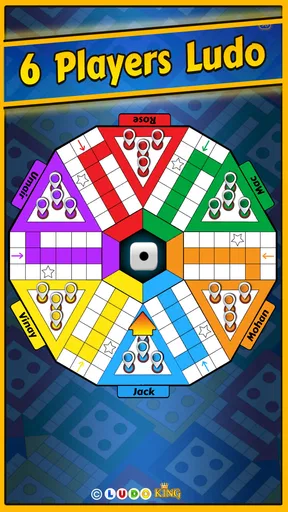


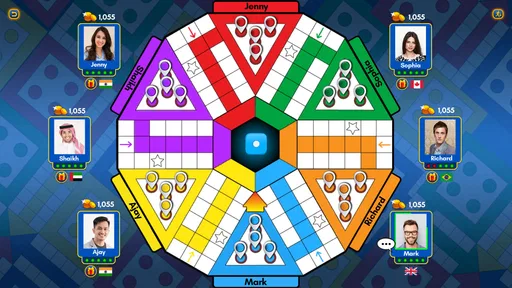

Our Review of Ludo King®
 Analysis by Appyee
Before installing a board game, I like to know what “free” really means and what kind of commitment it asks from me. Ludo King® is free to download, while optional in-app purchases are listed at prices ranging from $0.49 to $369.09 per item. That range is worth noticing, but it does not tell me what each purchase contains or whether it affects a match. I would treat spending as optional until I could inspect the individual offers in the app, rather than assuming that a purchase is needed to enjoy a basic game.
A familiar game with a low barrier to entry
For anyone who already knows Ludo, the appeal is immediate: the board and dice make the rules easy to recognize, so there is little to learn before starting. I would recommend it to families who want a familiar game on hand, friends who enjoy a relaxed bit of rivalry, and people who prefer turn-based play over fast reactions. Gametion developed this board game, which is rated for Everyone and runs on Android 7.0 or later. It is free to download, though its in-app purchases make it sensible to check purchase prompts before handing a device to a child.
The game’s popularity is substantial: it has over one billion installs, around ten million ratings, and an average rating of 4.2. Those figures suggest that many people have tried it, but they cannot tell me whether a particular match will be enjoyable or whether every player will like the same mode. I see the scale as a reason it is easy to find fellow players, not as proof that it will suit every household. It was released on December 17, 2016, and its broad familiarity is part of what makes it easy to suggest to someone who wants a recognizable game rather than a complicated new hobby.
What a short session can—and cannot—do
Ludo works best for me when I have enough time to follow a whole match rather than just tap through a few moments. Dice rolls create pauses and swings in fortune, so the game is less about precise control than deciding how to use the moves I get. If I am waiting briefly, I might start a game only when I can stay with it; if I have a longer break, the turn-based pace makes it easier to play without needing constant quick reactions.
That pacing is also a limitation. Anyone looking for a short, predictable round may find that a match lasts longer than expected, especially when several people are taking turns. A dice game can feel tense, but it cannot offer the same sense of control as a strategy game where every result comes from a deliberate move. I enjoy the uncertainty as part of Ludo, but I would choose a different board game if I wanted every win or loss to feel like a direct test of planning.
Fair play, chance, and spending
For me, the fairest way to approach a Ludo match is to separate the luck of the dice from the decisions around them. Choosing which token to move can matter, but chance still shapes what options appear. That makes it a better fit for playful competition than for anyone who wants a tightly skill-ranked contest. When a close game turns on an unlucky roll, I try to treat it as part of the format instead of evidence that the match was unfair.
The listed purchase range alone does not establish what can be bought, whether any purchase changes gameplay, or how purchases interact with online matches. I would not infer a pay-to-win system from the prices, and I also would not promise that every purchase is purely cosmetic. If spending matters to you, check each offer before confirming it and use your device’s purchase controls. That is particularly useful when a child is playing: the Everyone rating describes the content age category, while purchase supervision is a separate household decision.
Who should pick it up?
I would choose this app when the goal is to get a familiar board game going without explaining a long rulebook. It can suit a family evening, a casual game with friends, or a solo session against the computer when nobody else is available. The store description identifies it as a game for friends and family, and that social context matches the strongest reason I would open it: Ludo is more enjoyable when the players are comfortable with luck, waiting, and a little friendly teasing.
I would skip it if I wanted a deep tactical challenge, a match with a guaranteed short finish, or a contest where the more skilled player always has strong control over the result. I would also look elsewhere if I disliked dice-driven setbacks or did not want to review in-app purchase prompts. A dedicated strategy board game is a better fit for deliberate planning; a quick-action game is better when I have only a few minutes and need a definite stopping point.
The Perfect Blend of Old and New
When I first stumbled upon Ludo King®, I was instantly transported back to my childhood. Remember those lazy Sunday afternoons where Ludo was the center of attention? Well, now you can relive those moments right on your smartphone. The app stays true to the classic game mechanics but adds a digital twist that makes it accessible anytime, anywhere.
One of the first things you'll notice is how user-friendly the interface is. It's colorful, intuitive, and easy to navigate, making it a breeze even for those who aren't tech-savvy. You can choose to play against the computer or dive into multiplayer mode, which is where the real fun begins. There’s something incredibly satisfying about outsmarting friends or family members in real-time, no matter where they are in the world.
Features That Keep You Hooked
So, what exactly does Ludo King® offer that keeps players coming back for more? Let's break it down:
- Cross-Platform Play: Whether you're on Android or iOS, you can play with friends across different devices. This cross-platform functionality makes it super convenient to connect with others.
- Offline Mode: No internet? No problem. You can still enjoy a game of Ludo with the local multiplayer option. This is perfect for those moments when you're off the grid.
- Variety of Game Modes: Apart from the classic Ludo, there are additional modes like Snakes and Ladders. It’s like getting two games for the price of one!
- Customizable Rules: Want to add a personal twist to the game? You can adjust the rules to suit your preferences, just like you would with the physical board game.
Those options make it easier to match a game to the group in front of you. With relatives who know the traditional rules, I would settle on the familiar setup before starting; with friends who enjoy experimenting, I would agree on any rule changes first so nobody feels caught out halfway through. Offline local play is especially useful when several people are together but the connection is unreliable. It turns one phone into a shared board, although passing a device around is less comfortable than playing on a table with a physical set.
Cross-platform play can help when friends use different kinds of phones, but I would still arrange the match before everyone settles in: decide who is joining, make sure each person can reach the multiplayer option, and leave a little time for setup. That small bit of coordination prevents the familiar “are you in yet?” delay from swallowing the social part of the evening. If the group cannot get connected, a local game or an ordinary board is the simpler fallback rather than spending the whole gathering troubleshooting.
Each of these features adds a layer of depth to the game, ensuring that it never gets old. Whether you're waiting for a bus or just killing time during a break, Ludo King® is the perfect companion.
I would put a practical limit on that recommendation: a bus stop is a good place to continue a match already in progress, but not always the best place to begin one if I may need to leave at any moment. Ludo asks me to keep track of the board and other players’ turns, so interruptions can make a casual session feel more demanding than expected. At home, a useful routine is to agree on a stopping point before starting. That is more considerate than leaving a multiplayer game suddenly and keeps the app from turning a small break into an awkward unfinished commitment.
Visuals and Sound: A Feast for the Senses
Let’s talk aesthetics. The game’s visuals are vibrant and engaging, with a design that stays true to the classic board game feel. The app developers have done a fantastic job of keeping things simple yet appealing. The sound effects are subtle but effective, providing that little extra nudge of excitement when you capture an opponent's token or roll a six.
It’s the small details like these that elevate the experience and keep you immersed in the game.
Keeping it Social
If you're anything like me, you love a good social game. Ludo King® is perfect for this, offering a chat feature that lets you exchange banter with your opponents during the game. It's like sitting across the table from them, but in a virtual world.
Chat can make an online match feel warmer, but I would keep messages light and remember that the other players are people, not just pieces on a board. When I am playing with family or friends, the conversation is part of the pleasure. With people I do not know, I would avoid sharing personal details and use the available in-game controls if an interaction stops being enjoyable. That is a sensible way to keep a casual game casual, particularly when a child is using the device.
There’s also a leaderboard feature, so you can see how you stack up against other players worldwide. It adds a competitive edge that keeps you striving to improve.
I would use a leaderboard as a bit of context, not as a measure of whether I am good at the game. Ludo’s dice create streaks that can make a player look brilliant one moment and unlucky the next. If improving is the goal, I get more value from noticing choices I can control—such as which token to advance when I have alternatives—than from chasing a position that may depend partly on chance. For a family game night, I would ignore rankings altogether and focus on whether everyone is having fun.
Final Thoughts: A Must-Download
In a world where digital games often feel impersonal, Ludo King® brings a refreshing touch of nostalgia and connection. It's a game that bridges generations, allowing both young and old to enjoy a classic pastime with a modern twist.
If you haven’t already, I’d highly recommend giving Ludo King® a try. It's a lightweight app that won't take up much space on your device, but it offers endless hours of entertainment. So why not roll the dice and see where the game takes you?
My trust verdict
My recommendation is strongest for people who already enjoy Ludo and want an easy way to bring it to a phone, whether they are playing locally or connecting with friends. The rating is 4.2 from around ten million ratings, with about thirteen thousand written reviews, but I would read popularity as evidence of broad interest rather than a guarantee of a perfect fit. The real test is whether you enjoy the mix of familiar rules, social play, and unpredictable rolls.
On trust, I am comfortable recommending a cautious try: the download is free, the age category is Everyone, and the purchase range is visible enough to remind me to check before buying. What I would not do is assume that a price range explains the contents of every offer or proves anything about competitive balance. If you want a straightforward family board game and are happy to keep purchases under your control, this is an easy one to consider; if you need a purely skill-based contest or want no purchase prompts at all, another game may suit you better.
Privacy and Permissions
See what permissions an app requests and how it handles your data.
- Microphone
- record audio
- Other
- view network connections, pair with Bluetooth devices, full network access, change your audio settings, control vibration, prevent device from sleeping, Google Play license check
Verdict
Strengths of Ludo King®
- Cross-platform multiplayer support.
- Offline mode for local play.
- User-friendly interface design.
- Regular updates with new features.
- Engaging and nostalgic gameplay.
Limitations of Ludo King®
- Ads can interrupt the gaming experience.
- Limited customization options.
- In-app purchases can be pricey.
- Occasional connectivity issues.
- Repetitive gameplay for some users.
Similar Picks in This Category
View All
Ludo
Yarsa Games4.6

Tile Master® - Matching Game
Higgs Studio3.6

Checkers Online
CC Games4.6

Dominoes
Loop Games4.7

Chess
Chess Prince4.6

Ludo Superstar - Fun Game
BlackLight Studio Games4.6
You May Also Like
View All


Frequently Asked Questions
What platforms is Ludo King® available on?
Ludo King® is available for download on both Android and iOS platforms. You can find it on the Google Play Store for Android devices and the Apple App Store for iOS devices. The game is also accessible on Windows desktops, making it versatile for users who enjoy playing across different devices.
Does Ludo King® require an internet connection to play?
Ludo King® can be enjoyed both online and offline. While the offline mode allows you to play against the computer or local multiplayer with friends, the online mode lets you connect and compete with players worldwide. This flexibility ensures you can enjoy the game anytime, with or without internet access.
Are there in-app purchases in Ludo King®?
Yes, Ludo King® offers in-app purchases. These purchases can enhance your gaming experience by unlocking new themes, offering customizable options, or providing additional currency to use within the game. While the game is free to play, these optional purchases can help you personalize and enjoy the game even more.
Is Ludo King® suitable for children?
Ludo King® is suitable for players of all ages, including children. It’s a digital version of the classic board game Ludo, which is family-friendly and easy to understand. However, parents should be aware of in-app purchases and online interactions, ensuring children play in a safe and controlled environment.
How can I resolve issues or bugs in Ludo King®?
If you encounter any issues or bugs while playing Ludo King®, it's recommended to check for updates first, as developers frequently release patches to fix known problems. If issues persist, you can contact the support team through the app or via the developer's website. Providing detailed information about the issue will help in getting a quicker resolution.
Play our best games!


